New realities in legal workflow change
Legal teams are under pressure to do more with the same capacity: faster turnaround for the business, tighter control of risk, and a steady stream of technology promising to fix both. Yet many process redesigns and tool rollouts disappoint, not because the change was wrong in principle, but because it was built on an inaccurate picture of how the work is done today.
And although workflow improvement is a team-wide ambition, the starting point is always specific. Each workflow has its own triggers, people, decisions and handoffs, so it is critical for every legal leader to understand how their work actually moves before deciding what to remove, standardise or automate.
Legal workflows are harder to see than they look
Traditional process documentation lists tasks. It rarely captures how work progresses, who really decides, or where it waits. Two matters of the same type can follow very different paths depending on complexity, risk profile, who holds decision authority, and what information is available at the start. The documented procedure and actual practice drift apart, and the people who perform, supervise and receive the work each describe it differently.
As a result, workflow decisions require more than a task list. They require a structured view across five dimensions: what starts the work, who is involved, what gets done, what decides progress, and what information moves. Until both the stable core of a workflow and its variations are visible, decisions about redesign or technology rest on assumption.
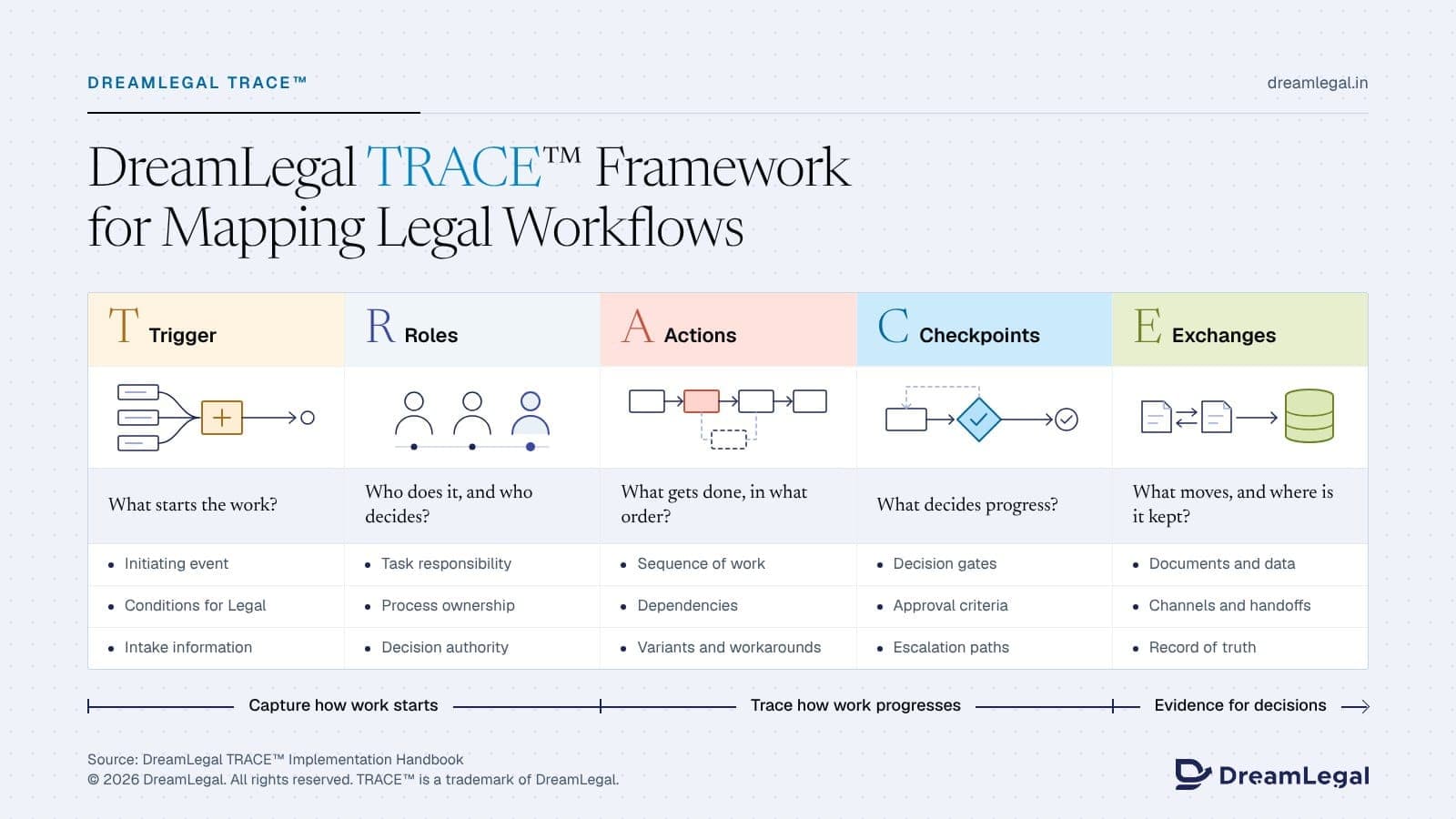
5 lenses of the DreamLegal TRACE™ framework
DreamLegal TRACE™ is DreamLegal's proprietary framework for this mapping task. Rather than starting from a process diagram or a tool's feature list, it reads one legal workflow through five connected lenses, applied stage by stage from the moment work begins to the point it is complete. Each lens answers a single question, and each fact about the workflow belongs to exactly one of them. The result is a picture of how work actually runs that the people who do it, supervise it and depend on it can all recognise.
Trigger. Every workflow begins with an event or condition, and an imprecise trigger is a common cause of incomplete intake. Mapping the trigger defines the scope of the work, the conditions that make Legal's involvement necessary, the channel requests arrive through and the information that should be captured at the outset rather than chased later.
Roles. Legal work crosses teams with different priorities. The goal is not simply to list who participates, but to separate four things that are often blurred: who participates, who is responsible for each task, who owns the process, and who holds decision authority. Owning a workflow is not the same as authority over its legal or commercial decisions.
Actions. Breaking work into its real sequence shows which steps depend on others, which add nothing, and where work is repeated. This includes the informal steps, workarounds and recurring variants that rarely appear in any system or procedure.
Checkpoints. A checkpoint without stated criteria becomes a negotiation. Mapping decision gates, approvals and escalation paths shows where judgement is genuinely needed, what standard applies, and which gates add delay without reducing risk. A review informs a decision; an approval makes it.
Exchanges. Delay in legal work often sits between steps rather than within them. Mapping what moves between people and systems shows where information is re-keyed, where versions diverge, where documents leave controlled systems, and which system holds the record of truth.
Together, the five lenses produce a single, structured map of one workflow, stage by stage. TRACE is a method for capturing work accurately. It does not redesign a process or select technology by itself; it produces the evidence those decisions need.
Taking a mapping approach fit for your role
Across the legal function, different leaders bring very different questions to the same map. For example:
- General Counsel and in-house legal teams: Seeing where decision authority and oversight sit, where they are missing, and why requests from the business stall.
- Legal operations professionals: Locating bottlenecks and approval queues, and separating what can be standardised from what needs legal judgement.
- Law firm innovation teams: Grounding process redesign and technology selection in how matters actually run, rather than how they are described.
- Knowledge management teams: Identifying where knowledge is created, reused and lost, and turning that into system requirements.
- Law firm partners and associates: Validating the map against live matters and using it to clarify stages, handoffs and client updates.
- Business stakeholders: Understanding what Legal needs at intake, and what causes delay on the way to a signed outcome.
These perspectives meet on one map. Those who lead the mapping depend on the people who do and decide the work to tell them how it really runs. Instead of applying a generic process template, legal teams should build each map from interviews, documents and observable records, and record disagreements between sources as findings in their own right.
What a completed TRACE map makes possible
A completed map is evidence, not a conclusion. Legal teams use it to support three distinct decisions:
- Redesign the process. Decide which steps to remove, merge, delegate or standardise, and which delays are justified by risk.
- Write technology requirements. Derive a requirements brief from the actual workflow before any product is compared or shortlisted, rather than from vendor feature lists.
- Set ownership. Produce a written model of process ownership, task responsibility, decision authority and escalation.
What effective workflow mapping looks like
Across practice areas and operating models, several patterns characterise legal teams that map and improve work well. These teams:
- Map the current process first, then its variations, before proposing any change.
- Separate observation from assumption, and treat every unsupported claim as a question for further mapping.
- Distinguish recurring problems from isolated exceptions, so redesign targets what actually repeats.
- Tell design problems apart from execution problems, using process change for one and guidance, training or oversight for the other.
- Recognise that technology helps where the cause is manual handling or missing data, but does not fix unclear authority or unwritten criteria.
- Validate the map with the people who do the work before acting on it.
Not every finding needs automation or a new tool. Many are resolved by assigning an owner, writing criteria down or retraining. Where technology is needed, the map supplies the requirements to evaluate it against.
Implementation handbook
Download the DreamLegal TRACE™ Implementation Handbook for the full step-by-step method, a worked vendor NDA example and a mapping template you can apply to your own workflows. Then turn your TRACE map into a shortlist: compare legal technology against your own requirements on DreamLegal.