
Case Crafter: Litigation Case Management software
Trial Presentation & Legal Timeline Software
Case Crafter is trial preparation and presentation software for litigators. It lets lawyers review and annotate case documents, build automatic chronologies of case events, and display evidence in court from a desktop or iPad. Case Crafter's website positions it as suited to trial attorneys who want to organise a case from discovery through verdict and present it to a jury or judge.
Product
Case Crafter
Last updated
Considering Case Crafter?
Compare it against your team's workflow, integration, and approval needs.
Are you representing Case Crafter?
Claim this profile to update product capabilities, respond to buyer reviews and manage your organization's listing on DreamLegal
Claim Your ProfileOverview
What Case Crafter does
Case Crafter combines trial preparation and courtroom presentation in one application. Users import documents, which are OCRed on import so the whole case can be searched, and can highlight, annotate, tag and label exhibits. The interactive timeline builds a chronology of identified case events automatically. A presentation mode shows only the evidence to the courtroom, with pause, laser pointer and hide controls. A compare view places two documents side by side from version 2.2 onward. Cases can be kept on a single device or synced to the cloud to work across PC, Mac and iPad and share with a team, with multi-factor authentication. Case Crafter's website presents the product as aimed at trial lawyers, and quotes testimonials from law firm partners and owners.
What it does
Case Crafter core capabilities
Highlight important facts
Built-in document editor with highlights, callouts, and sticky notes.
Every type of media supported
Import PDFs, images, video, and audio files as case evidence.
Full text search
Documents auto-OCRed and indexed for fast cross-case search.
Interactive timeline
Case facts automatically added to a visual interactive chronology.
Tag and filters
Custom tags group and filter facts for easier recall.
No internet required
Entire case stored locally on device for offline use.
Works on all major platforms
Available on Windows, Mac, and iPad.
Easy connection
Auto-detects projector connection for courtroom presentation.
Technical specifications
- Offline local storage
- Platforms: Windows, Mac, iPad
- OCR indexing
- Full-text search
- Auto projector detection
- Media: PDF, image, video, audio
- Drag-and-drop document management
Who it is for
Who Case Crafter is built for
Target audience
- Chambers & Individual Lawyers
- Mid-Sized Law Firm
Case studies
No case studies yet
Case Crafter doesn’t have a client-confirmed case study on DreamLegal yet. Try exploring different products for exploring case studies.
Trust & compliance
Case Crafter security at a glance
Security certifications
Named enterprise customers
Pricing details
Case Crafter pricing
Starting price
Pricing model
Free version
Product videos & screenshots
See Case Crafter in action
Product interface
Case Crafter Interface
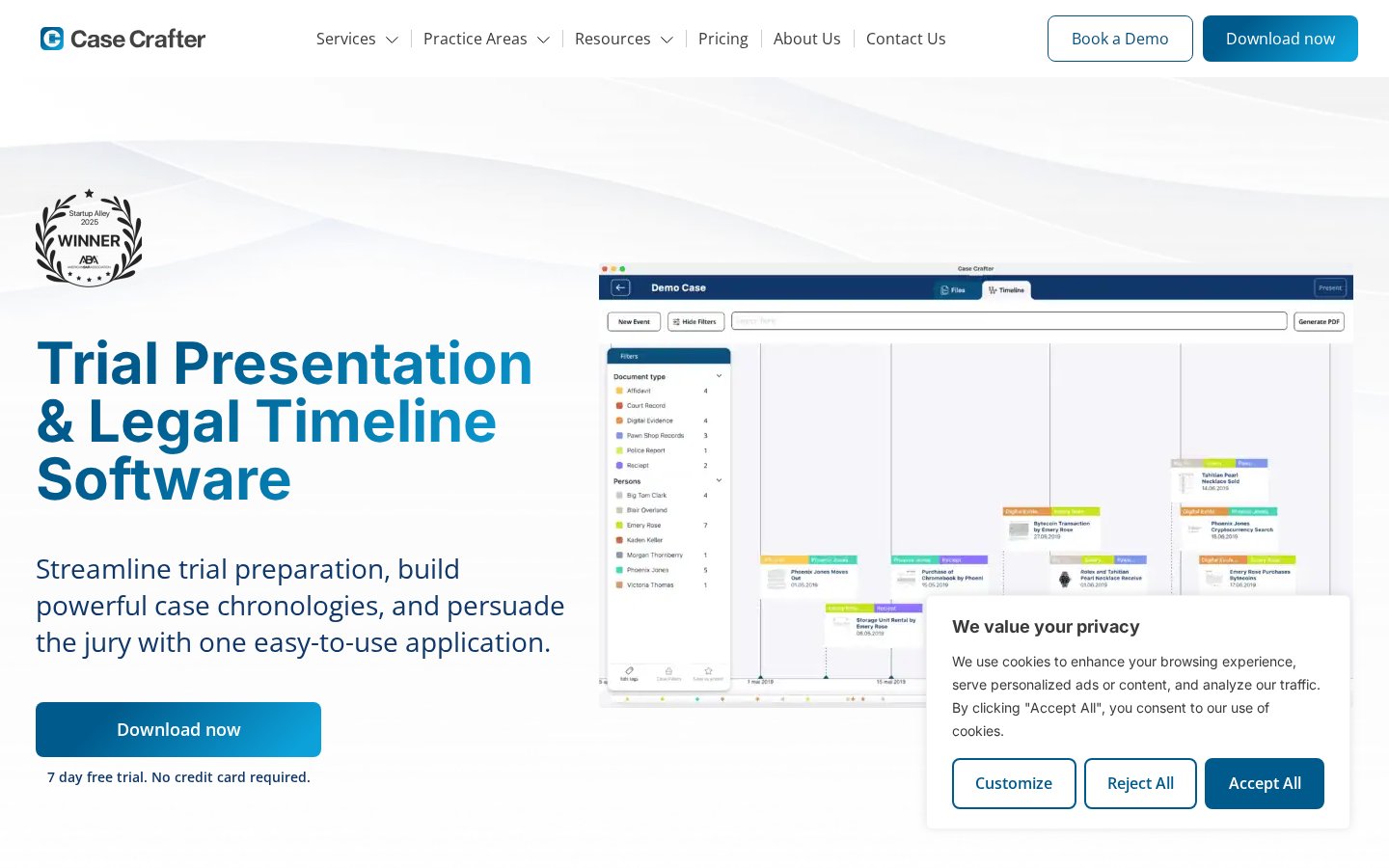 1/3
Comparisons
Popular Case Crafter comparisons
Evaluate how Case Crafter stacks up against competing legal tech solutions on features, compliance, and deployment.
 Volody
 ChartInsight
 Legistify CLM
 Adobe Document Cloud (Acrobat & Acrobat Sign)
Alternatives
Top alternatives to Case Crafter
Discover verified legal software options offering similar workflow capabilities and regional compliance standards.

Volody
No case studies yetSecure, Smart, and Simple AI Contract Management Software

ChartInsight
No case studies yetCustomizable, verifiable medical summaries

Legistify CLM
No case studies yetEnd-to-End AI Legal Solutions at Scale

Adobe Document Cloud (Acrobat & Acrobat Sign)
No case studies yetDo business faster with eSign features from Acrobat.

Filevine Platform
No case studies yetA singular system for clarity and command


AODocs
No case studies yetControl the knowledge. Accelerate delivery.

Case Crafter news and updates
View all
Transparency
Case Crafter sources
Pages used to generate and verify this profile.
FAQs
Frequently asked questions about Case Crafter
Trial presentation software displays documents, images, video, and timelines clearly during hearings or trials. Attorneys use it to organize exhibits, build case chronologies, and present evidence to the jury or judge in a persuasive, structured format during courtroom proceedings.
Trial preparation software focuses on reviewing, tagging, and organizing case documents, while presentation software displays those materials in court. Case Crafter combines both functions in one tool, letting attorneys prepare a case and then present it effectively without switching between separate applications.
All case data is stored locally on the user's device, reducing exposure to online security risks. Attorneys maintain full control over client information throughout preparation and trial, supporting confidentiality without relying on cloud storage or internet connectivity during courtroom use.
Latest Insights